
A technical walkthrough from runtime preparation and network-share discovery to concurrent file encryption
DragonForce is a Ransomware-as-a-Service (RaaS) operation that first surfaced in mid-to-late 2023. It initially presented itself as a hacktivist collective before shifting to a profit-driven model. Early payloads were built on leaked LockBit 3.0 source code and later supplemented with code derived from the leaked Conti builder. In March 2025, the operation restructured into a “ransomware cartel” model, offering white-label infrastructure that allows affiliates to operate under their own branding while relying on DragonForce’s backend tooling. By mid-2026, its leak site had claimed several hundred victims across dozens of countries.
We traced a Windows DragonForce sample from process entry through the final return from its main routine. The observed execution combines runtime preparation, process interference, shadow-copy deletion, ARP-based SMB target discovery, parallel file encryption, and desktop customization.
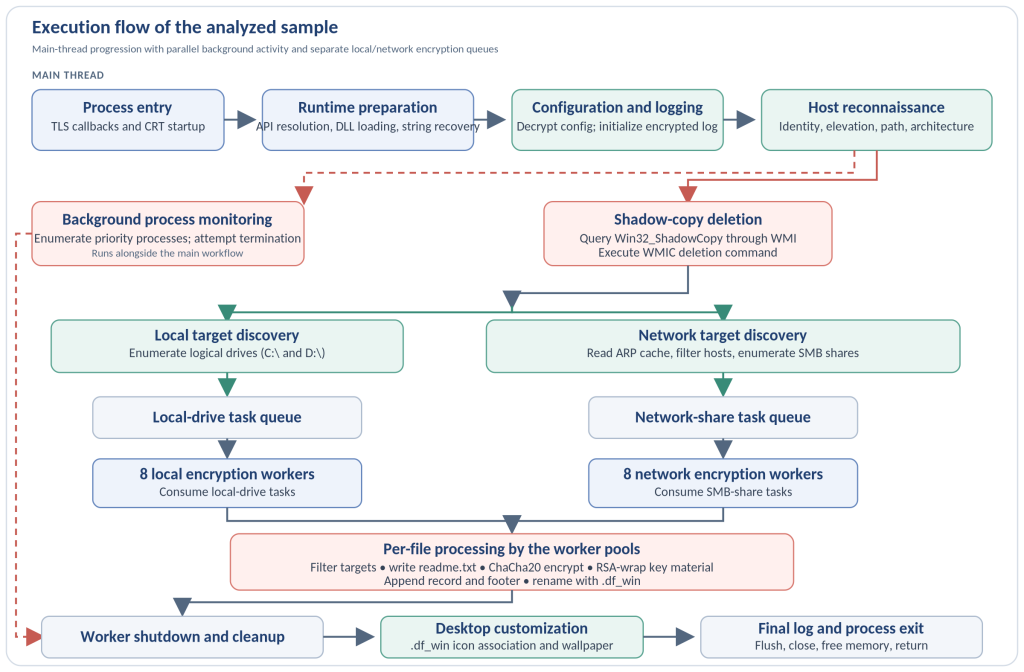
Execution flow at a glance
The diagram separates the main-thread progression from activity that runs in the background. Target discovery publishes local and network paths to distinct queues, which the encryption workers consume as tasks become available.
Runtime preparation and host reconnaissance
Process startup and API resolution
Two TLS callbacks perform compiler-generated runtime setup before the PE entry point passes execution to the C Runtime (CRT). The CRT then calls DragonForce_Main(), where the sample begins its own initialization.
DragonForce manually resolves LoadLibraryA from kernel32.dll, then uses it to load eleven Windows libraries using decrypted DLL names. GetProcAddress() resolves the required functions from those modules. The resolver inspects returned stubs for relative or indirect jumps and checks that the jump targets fall within the sample’s .idata section, validating the expected import-table thunks. The resolved APIs are already represented in the PE import table, so this mechanism does not conceal those capabilities from static import inspection. If the initial LoadLibraryA resolution fails, the sample exits before continuing.
Encoded strings
File paths, registry paths, DLL names, API names, process names, command-line switches, and other meaningful strings are stored in encoded form and recovered when needed. The same routine is reused throughout execution. It applies a reversible affine transform modulo 127, with multiplication by 7 during encoding and the modular inverse during decoding. This keeps strings out of their directly usable form in the binary, while the decoded values become available in memory when required.
Encoding: E(x) = (7x + 0x6A) mod 127
Decoding: D(y) = (109 * (y – 0x6A)) mod 127
Configuration and encrypted logging
The embedded configuration is stored as one encrypted blob. At startup, the sample constructs a ChaCha20 state, decrypts the blob, and splits the resulting pipe-delimited string into individual settings. The recovered configuration-decryption state was identical in the two observed executions.
The runtime log is written to C:\Users\Public\log.log. Its first 16 bytes contain the build_key and instance_key in plaintext, eight bytes each. Subsequent entries include a timestamp and thread identifier, are encrypted with a separate ChaCha20 state, and are written to the same file. The entries record host identity, elevation, process handling, drive discovery, share processing, and file activity. The log is a useful execution artifact when the relevant key material is available.
Host reconnaissance
Before target processing, the sample retrieves the current user SID and resolves account information, checks token elevation, obtains its executable path, and checks whether it is running under WOW64. The analyzed sample was a 32-bit executable running on 64-bit Windows, and its runtime log recorded an elevated process token.
Process interference and recovery preparation
A configurable priority list contains 38 process names spanning security, backup, database, and productivity software. Background monitoring workers repeatedly enumerate running processes, compare names against this list, and attempt to terminate matches. In the observed runs, opening MsMpEng.exe failed with ERROR_ACCESS_DENIED, while Firefox.exe was successfully terminated.
DragonForce also initializes COM and WMI, queries the Win32_ShadowCopy class, and uses each returned shadow-copy identifier to construct and execute a WMIC deletion command. This removes the local Volume Shadow Copies before file processing begins:
cmd.exe /c C:\Windows\System32\wbem\WMIC.exe shadowcopy where “ID='<shadow-copy-id>'” delete
When a target file cannot initially be opened, a separate path invokes the Windows Restart Manager. In the documented example, opening C:\DumpStack.log.tmp returned ERROR_SHARING_VIOLATION, and the file was skipped.
Discovering local and network targets
The sample enumerates logical drives with GetLogicalDriveStringsW(). The observed run identified C:\ and D:\ and published them to the local-drive task queue. Local-drive discovery and file processing overlap: workers begin on a published drive before enumeration of the remaining drive has finished.
For network discovery, DragonForce reads the existing IPv4 ARP cache through GetIpNetTable() and filters candidate addresses against embedded prefixes. This uses hosts already represented in the cache rather than actively scanning the subnet. For each candidate address, NetShareEnum() enumerates SMB shares and the reachable paths are published to the network task queue.
The recovered runtime log records seventeen share discoveries across more than a dozen internal addresses. Most were administrative C$ shares, but non-C$ shares such as \\192.168.9.114\share and \\192.168.9.114\Users also reached the task-publication path. The sample then processed files through multiple SMB shares alongside local-drive targets.
Concurrent file encryption
DragonForce creates sixteen encryption workers in two batches of eight. One batch consumes tasks from the local-drive queue, while the other consumes tasks from the network-share queue. Each batch uses its own synchronized task structure. Workers can therefore process local and network targets concurrently as discovery publishes new paths.
Per-file key handling
For each file, the sample generates fresh material with CryptGenRandom(): a 32-byte key and an 8-byte state value. These values initialize a new ChaCha20 state used to encrypt the file content. The per-file material is then protected with CryptEncrypt() using the RSA public key embedded in the sample. The 0x214-byte PUBLICKEYBLOB carries the RSA1 marker and contains a 4096-bit modulus with public exponent 65537.
After encryption, the sample appends two distinct records to the file and finalizes it with SetEndOfFile():
WriteFile: 0x20C bytes (524-byte RSA-processed record)
WriteFile: 0x0D bytes (13-byte metadata footer)
SetEndOfFile()
The 13-byte footer stores the encryption-percentage flag and the original file size. The observed full-encryption example uses a percentage value of 100. The RSA private key is not embedded in the analyzed sample.
File filtering and renaming
Before processing, workers apply directory, extension, and filename exclusions, including the configured readme.txt exclusion. The sample also checks the DLOGFILE0001 content marker and skips a file when it is present. A separate hardcoded list of more than 200 database and virtualization-related extensions routes matching files to the 20% partial-encryption path. The observed Victim.txt example followed the full-encryption path.
| Recovered setting | Configured value |
| full_encrypt_threshold | 2,097,152 bytes (2 MB) |
| header_encrypt_threshold | 10,485,760 bytes (10 MB) |
| header_encrypt_size | 3,145,728 bytes (3 MB) |
| other_encrypt_chunk_percent | 20% |
Once encryption is complete, the original filename is replaced with a randomized alphabetic name and the configured .df_win extension. The observed example changed Victim.txt to 5stq3an4ztrbkhnt.df_win.
Ransom note and cartel branding
Before encrypting files in a directory, DragonForce writes a readme.txt ransom note. The note identifies the operation as “The DragonForce Ransomware Cartel” and claims that data was stolen before encryption, offering to provide a list of the stolen files. Its build/instance key-derived identifier can be correlated with the runtime artifacts from the same sample.
The analyzed execution did not show a data-upload operation or a separate exfiltration channel. The ransom note’s data-theft statement is therefore a claim made by the note, not a behavior demonstrated in the execution trace.
Desktop customization and completion
After worker cleanup, the sample extracts an icon and wallpaper embedded in its executable and writes them to C:\Users\Public\icon.ico and C:\Users\Public\wallpaper_white.png. It creates the HKEY_CLASSES_ROOT\.df_win\DefaultIcon association so Windows can display the custom icon for encrypted files.

The wallpaper routine enumerates HKEY_USERS and attempts wallpaper-related registry writes for the listed profile contexts, then calls SystemParametersInfoW() to apply the wallpaper to the active session.

The sample records a final Finish entry, flushes and closes its runtime log, frees remaining memory, and returns from DragonForce_Main() through the normal CRT shutdown path.
Execution perspective
The analyzed sample combines early process interference and recovery-point deletion with ARP-based network discovery and a parallel encryption engine that treats local drives and SMB shares as separate work streams. Per-file ChaCha20 encryption, RSA-protected key material, appended metadata, randomized .df_win names, and desktop changes complete the observed execution chain.
For the complete execution trace, MITRE ATT&CK mapping, indicators of compromise, and function/address reference, see the full technical analysis: