

Introduction
Over the past few months, tax-themed phishing and malware campaigns have surged, particularly during and after the Income Tax Return (ITR) filing season. With ongoing public discussions around refund timelines, these scams appear more credible, giving attackers the perfect context to craft convincing lures.
We recently analyzed emails impersonating the Indian Income Tax Department (ITD). At first glance, the message resembled an official “Tax Compliance Review Notice.” However, deeper investigation revealed it was part of a broader phishing campaign targeting Indian businesses with a multi-stage infection chain designed to deploy persistent Remote Access Trojans (RATs) or infostealer malware.
This blog provides a detailed breakdown of the email, the infection flow, attacker tactics, and how these lures fit into today’s evolving threat landscape.
Initial Vector
The initial attack vector in this campaign is a spear-phishing email spoofed to appear as an official communication from the Income Tax Department.
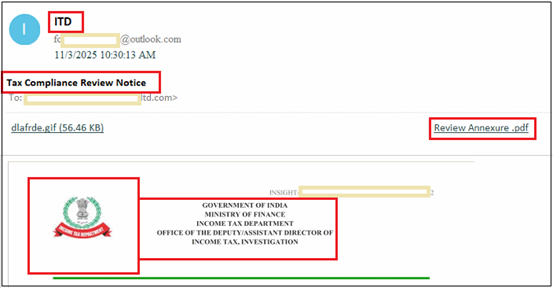
A closer examination of the sender’s email address shows it originated from an Outlook.com domain, which is unusual since government agencies typically avoid public webmail services for official communication. This raised suspicion. Additionally, the subject line, “Tax Compliance Review Notice,” is a common lure in recent ITR-themed phishing campaigns, where attackers attempt to convince recipients that they’ve missed a compliance requirement or that their filings are under review.
What makes this email particularly noteworthy is that the body contains no text at all. Instead, it features a single embedded image crafted to resemble an authentic ITD notice.

This tactic helps bypass text-based spam filters and keyword detection in email body. The image includes:
- Government of India emblem
- “Ministry of Finance — Income Tax Department” header
- A fake office reference (Deputy Assistant Director of Income Tax, Investigation)
- Fabricated reference numbers, DIN, and dates
- And a strict compliance deadline
The email contained an attachment labeled “Review Annexure.pdf,” which appears to be intended as the next stage in the phishing or malware delivery sequence. The template closely replicates legitimate Income Tax Department notices, increasing its effectiveness as a social engineering lure—particularly against recipients with limited technical awareness.
Infection Chain
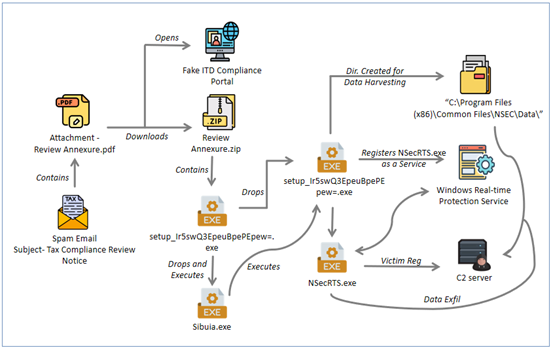
The diagram below outlines the complete infection sequence used in this campaign. It starts with the Income Tax–themed phishing email and proceeds through the PDF lure, fake compliance portal, and forced ZIP download. The two-stage NSIS installers then unpack a number of files, deploy persistence via a Windows service, and begin harvesting system information before connecting to multiple C2 servers. This visual flow highlights how a seemingly harmless compliance notice ultimately leads to suspicious remote-access capability.
Analysis of Attachment (Review Annexure.pdf)
Opening the attached PDF revealed something far more interesting than a simple tax notice. Instead of providing any legitimate compliance details, the document contained a follow-up instruction labeled “Annexure A”, which attempted to reinforce the urgency of the earlier email.

The attackers constructed a narrative asserting that a review notice had been issued on 03 October 2025 and that the organization had “failed to comply.” This is a classic social engineering pressure tactic—creating a sense of prior non-compliance to heighten urgency and increase the likelihood of immediate action by the recipient.
The Annexure pdf included a step-by-step walk through directing the user to log in to a fake “Compliance Portal” Buried inside these steps was the malicious URL – hxxps://www.akjys.top/
Fake ITD Compliance Portal and Malware Auto-download Trigger
Clicking the URL embedded in the PDF (hxxps://www.akjys.top/) takes the victim to a fake Income Tax Department Compliance portal. Instead of displaying any legitimate login page, the site immediately triggers a download of a file named “Review Annexure.zip”.
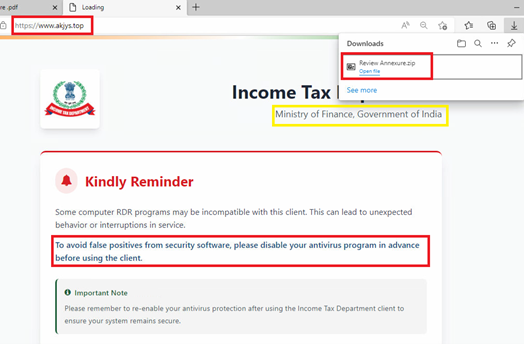
This forced-download behaviour is a common technique in malware delivery chains nowadays, allowing the threat actor to deliver the payload as soon as the victim lands on the site. We have seen this technique recently employed in .SVG file based malware campaign as well targeting Colombian users with AsyncRAT malware.
What makes this page particularly suspicious is the message displayed in the centre of the screen:
“Some computer RDR programs may be incompatible with this client…
To avoid false positives from security software, please disable your antivirus program in advance before using the client.”
No government portal, especially one related to tax compliance or investigations would never instruct users to disable their antivirus. Threat actors often use this tactic when their payloads are known to be detected by common endpoint security tools. By framing it as a “compatibility issue,” they attempt to lower the victim’s guard and increase the chance of successful execution.
The attackers even added a misleading reassurance:
“Please remember to re-enable your antivirus protection after using the Income Tax Department client.”
This additional instruction is a classic social engineering tactic intended to make the request appear routine. In reality, disabling security controls prior to executing unknown software is a behavior commonly exploited by malware families including ransomware to ensure successful compromise.
Downloaded “Review Annexure.zip” when extracted contains an executable file with name “setup_Ir5swQ3EpeuBpePEpew=.exe”, having the size of around ~150 MB. Analysis of this file is described in next section.
Stage-1: Analysis of Downloaded File (setup_Ir5swQ3EpeuBpePEpew=.exe)
This setup file is NSIS compiled and is digitally signed by 衡水深帷科技有限公司[Hengshui Shenwei Technology Co., Ltd.]. Adding signing details is a commonly used technique by threat actors to evade detections and deceive user to consider this file is legitimate installer .
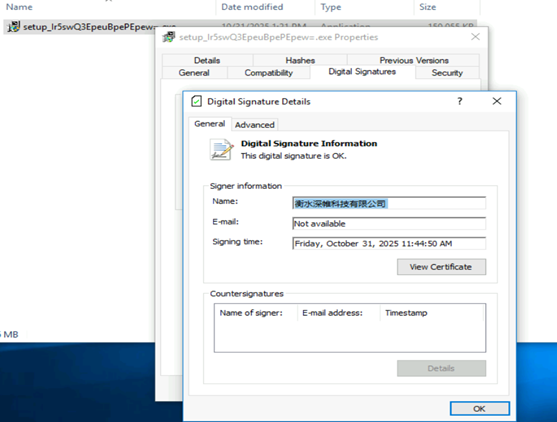
Upon extracting this file, we found it bundles multiple files inside it.
This NSIS installer runs as a silent loader, unpacking everything into a temporary directory without showing any installation interface to the user.

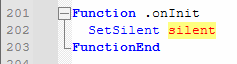
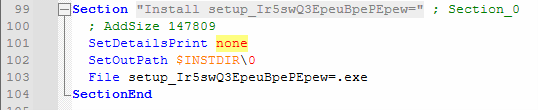
It drops multiple supporting components, including the signed wrapper and internal executable –
Drops supporting binaries and data files and executes “Sibuia.exe” with the parsed arguments-
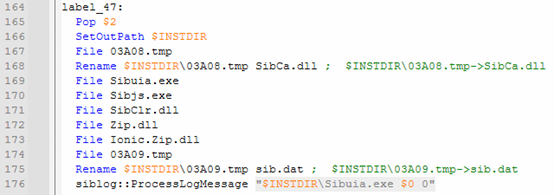
Sibuia.exe spawns another “setup_Ir5swQ3EpeuBpePEpew=.exe” as a child process from the temporary \0\ directory, effectively handing off execution to the another signed installer payload, i.e. “setup_Ir5swQ3EpeuBpePEpew=.exe”.

Once the payload is launched, the script immediately begins self-cleanup, deleting the dropped files and the folder to reduce on-disk evidence.

So, the setup file downloaded from fake income tax compliance portal only deploys the next stage and hands off the real payload installer, then erases its own footprint.
Stage-2 : Analysis of Next Stage(setup_Ir5swQ3EpeuBpePEpew=.exe)
Next stage installer file also having the file name as “setup_Ir5swQ3EpeuBpePEpew=.exe”, but the file is different to that of the stage-1. This file is again having the larger size of around ~147 MB and has a valid digital signature of “Shandong Anzai Information Technology CO.,Ltd”.
This installer is a Chinese – GUI-based package named “客户端安装包 3.7.85.1000” and when executed, it shows below installation GUI –
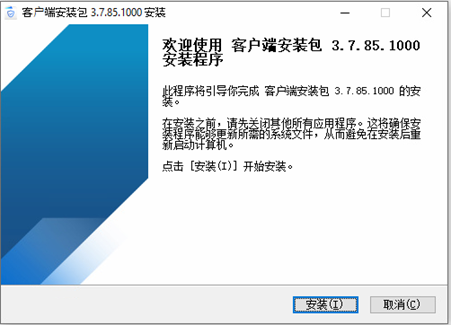
The package extracts a huge set of binaries, DLLs, drivers, tools etc. at “C:\Program Files\Common Files\NSEC“. All files and folders inside this installation directory are super hidden and are protected by system attributes.
It deploys kernel drivers, Outlook add-ins, remote desktop components, curl.exe, certutil.exe and multiple Sysinternals utilities.
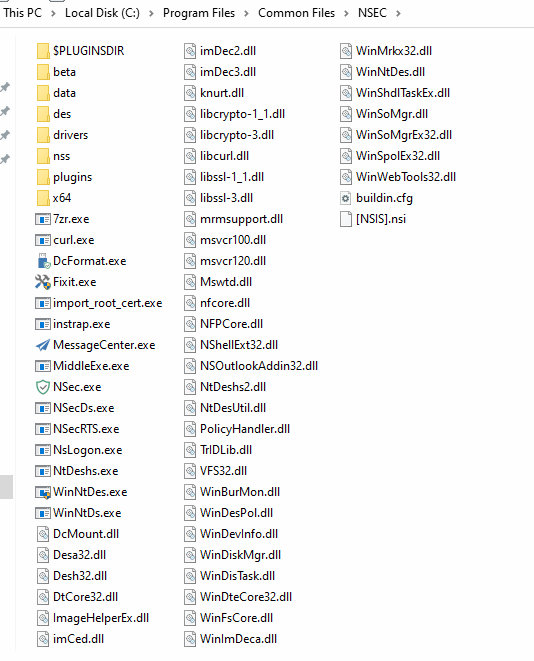
Collectively, this set of binaries forms a full monitoring and control package that can enable a remote access or endpoint control, rather than a normal productivity application.
Persistence
The second installer achieves persistence by using Windows Services. The configuration entry found in file buildin.cfg assigns NSecRTS.exe as the active process for both 32-bit and 64-bit systems. The executable is then registered with the service related to “Windows Real-time Protection Service”.
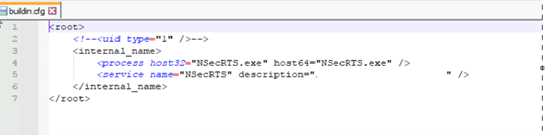
So the configuration in file isn’t just listing components but instructing the system to run NSecRTS.exe in the background by default, making it a persistent service.
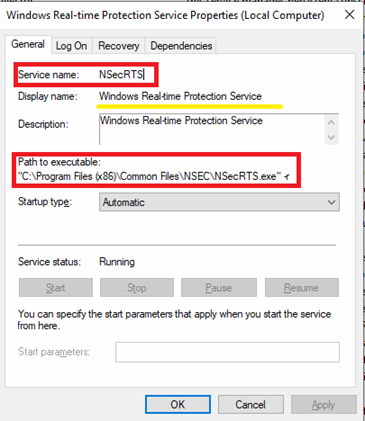
Once persistence is established, the NSecRTS.exe service launches autonomously and immediately begins preparing the host for remote administration. To achieve this, the service creates a directory with name “Data” inside its installation directory:
- C:\Program Files (x86)\Common Files\NSEC\Data
The directory acts as a collection directory where the implant stores harvested details gathered from the victim machine, such as OS version, installed applications, running services, and hardware details etc.
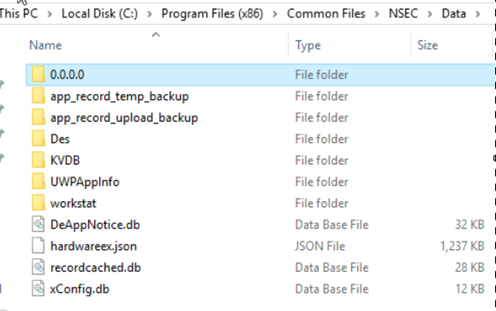
The “.\Data” directory follows a structured format typically seen in remote administration or surveillance tools.
One of the example of harvested data related to user accessed application is present in below format –
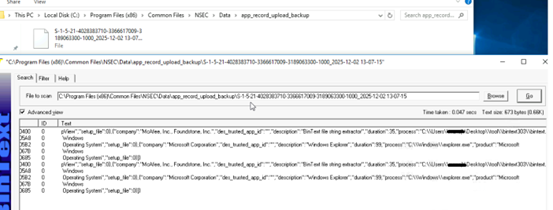
After the data is harvested, it tries to establish a connection to its C2 server. Once the C2 server connection has been established, TA registers victim machines in C2 panel by a UID. This UID is used to uniquely identify and track the victim machine.
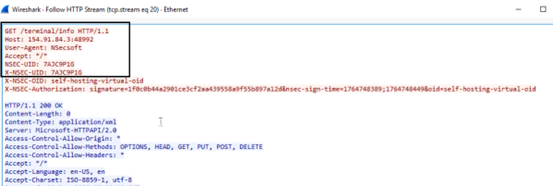
Once the connection is successful, TA uploads the collected data in the “Post” request and additionally receiving the commands to execute or deploy other files on victim’s machine. This C2/network communication is secured by maintaining an encrypted connection by sharing encryption keys.

NSecRTS.exe establish connection to C2 server (154[.]91[.]84[.]3) using multiple non-standard ports, like, 48991,48992,3898 etc.
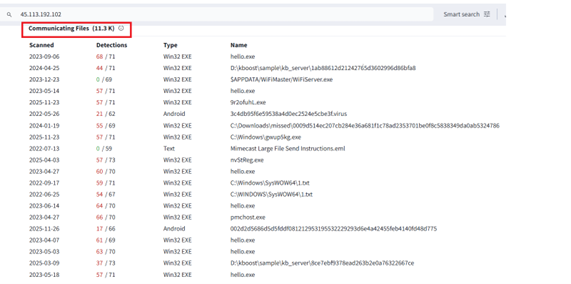
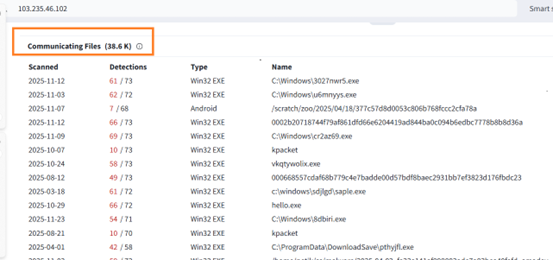
Also, it tries to establish network connection with couple of other IP address as well 45[.]113[.]192[.]102:80 and 103[.]235[.]46[.]102:80 as an alternative C2 .

We found that, these IP’s are been communicated by number of other files including malicious ones.
Collectively, Multiple technical indicators observed during analysis of installers point toward a China-linked development environment rather than a globally sourced commodity. The installer ecosystem, extensive Simplified Chinese language usage, and the presence of a Chinese-registered code-signing entity collectively suggest that the tooling was either developed, compiled, or packaged within a Chinese software or threat ecosystem.
The installer behaves more like a RAT than a simple data collector, maintaining persistence, collecting system details and remote command capability.
Conclusion
This campaign exemplifies a highly orchestrated social engineering tactic, leveraging a fraudulent Indian Income Tax compliance notice to entice victims into triggering a multi-stage infection chain.
Rather than simple document exfiltration, the delivered installer establishes persistence, collects extensive system information, and maintains command-and-control channels capable of remote task execution. Its behavior aligns more closely with a full-featured Remote Access Trojan (RAT) than a basic surveillance utility. Multiple technical indicators suggest a China-linked build environment behind the operation.
The lure may appear straightforward, but the underlying infrastructure is anything but underscoring a critical reminder for defenders: even familiar, finance-themed phishing emails can escalate to complete device compromise, far beyond mere credential theft.
IOCS:
File hashes(MD5) –
4001854be1ae8e12b6dda124679a4077
F00F824FCAFBA9B26675AE8242F0B6A0
IP’s/ Domain –
hxxps://www.akjys.top/
154[.]91[.]84[.]3
45[.]113[.]192[.]102
103[.]235[.]46[.]102
154[.]91[.]84[.]3[:]48991
154[.]91[.]84[.]3[:]48992
154[.]91[.]84[.]3[:]3898
QH/Seqrite Detections:
PUA.NSecsoftCiR
Trojan.AgentCiR
MITRE Attack Tactics, Techniques, and Procedures (TTP’s) –
| Tactics (ATT&CK ID) | Techniques / Sub-technique (ID) | Procedure |
| Initial Access (TA0001) | Phishing: Spearphishing Attachment (T1566.001) | Fake Income Tax PDF delivered as “Review Annexure.pdf” |
| Initial Access (TA0001) | Phishing: Spearphishing Link (T1566.002) | PDF directs user to fake ITD portal URL & trigger auto-download of malware ZIP. |
| Execution (TA0002) | User Execution (T1204) | Victim manually runs extracted executable “setup_Ir5swQ3EpeuBpePEpew=.exe.” |
| Execution (TA0002) | Signed Binary Proxy Execution (T1218) | Digitally signed NSIS installers to appear legitimate. |
| Defense Evasion (TA0005) | Subvert Trust Controls: Code Signing (T1553.002) | Chinese code-signed payloads used to bypass security checks. |
| Defense Evasion (TA0005) | Artifact Deletion (T1070.004) | First-stage loader deletes dropped files & temp folders after execution. |
| Defense Evasion (TA0005) | Obfuscated/Encrypted Payloads (T1027) | Multi-stage NSIS wrapping with hidden components & protected directories. |
| Persistence (TA0003) | Create/Modify System Process: Windows Service (T1543.003) | NSecRTS.exe registered as a persistent background service. |
| Persistence (TA0003) | Boot/Logon Autostart Execution (T1547.001) | Service automatically runs at boot without user interaction. |
| Discovery (TA0007) | System Information Discovery (T1082) | Harvests OS version, machine details, hardware, services. |
| Discovery (TA0007) | Software Discovery (T1518) | Collects installed application details. |
| Command & Control (TA0011) | Web Protocols (T1071.001) | Uses HTTP/HTTPS with UID registration to maintain network communication. |
| Command & Control (TA0011) | Non-Application Layer Protocol (T1095) | C2 uses multiple non-standard ports (48991/48992/3898 etc.) for communication. |
| Command & Control (TA0011) | Commonly Used Port (T1043) | Alternative fallback communication via port 80 on two additional C2 IPs. |
| Exfiltration (TA0010) | Exfiltration Over Web Services (T1567.002) | Harvested telemetry posted back via HTTP POST to primary C2. |
| Exfiltration (TA0010) | Scheduled Transfer (T1029) | Data uploaded regularly as suspicious process continues to run in the background. |
| Remote Access (TA0012) | Remote Access Tools (T1219) | NSecRTS.exe enables remote command reception, tasking, and persistence. |